Friday, July 25, 2008

Official 850 MHz ROM update for the HTC Diamond


After an unofficial ROM patch which appeared last week on XDA Developers website, HTC has now released a ROM update which officially adds GSM 850 MHz to the HTC Diamond making it a quadband GSM smartphone know which can be used anywhere in the GSM networks. In addition to adding GSM 850 MHz support, ROM v1.93.831.1 WWE also fixes some bugs HTC Diamond users have seen already, such as no signal issue, no action while touching navigator control in camera mode as well as SMS sound alert notification delay issue. Furthermore it's said to increase the overall device performance including improved audio quality after audio booster is enabled, improved TouchFLO 3D tab switching and movement speed or improved home page loading speed.

The new ROM build is now available from HTC's Hong Kong support website. It didn't appeared on other support sites yet and a single operator which is offering the new ROM for OEM Diamonds already. Howevew, it should be just a matter of time until the new ROM build is available from all HTC support sites as well as carriers.

Monday, July 21, 2008

HTC Diamond easy tweaking - DiamondTweak


MonteChristoffOn from XDA-Developers, inspired by the very popular KaiserTweak, has created DiamondTweak, an app to ease changing of the various registry entries that make your HTC Diamond work much better.

Featuring essential registry edits such as the ones to disable TouchFlo3D and the ability to disable fast sleep during phone calls, this app is a "must have" for your HTC Diamond.

At the moment DiamondTweak supports only English and French languages, more translated version are expected soon.

You can download DiamondTwea at XDA-Developers here.

Friday, July 18, 2008

HTC Diamond radio ROM does 850Mhz


The lack of support for the 850Mhz GSM frequency band that americans love to use keeping HTC Diamond from sweeping across USA as the next big competitor (and a capable one at that) to the iPhone 3G. Sure, 850Mhz has better penetrating power than the higher frequency 900Mhz band that's used in ubiquity throughout the rest of the world. However it still means the US has to wait for European handsets to make the jump to the US.But, the thing is, Euro handsets usually lag in hitting the US market due hardware limitations. We were under the impression that the HTC Diamond, in European trim, lacked the radio hardware to jump on the 850Mhz frequency in the US. Lo and behold, there's 850Mhz support built-in to the HTC Diamond! Who knew?

A new radio ROM has surfaced at XDA developers that somehow enables 850Mhz support in the HTC Diamond. This basically means an HTC Diamond with this radio firmware is now a USA-compatible, quad-band GSM smartphone - albeit, EDGE data is about as good as it's going to get.
So, if you can't wait to jump on the HTC Diamond before it hits the US in official quad-band spec, grab a European HTC Diamond and give it some unofficial ROM-love. Just remember, you're messing around with critical firmware at your own risk.

HTC Diamond 850Mhz radio ROM

Tuesday, July 15, 2008

Android running on HTC Touch Devices


UPDATE: see Android on Diamond and Raphael
It seems that the guys over at XDA Developers, a Windows Mobile centric hack/developer site, have managed to get Android running on a number of HTC devices.

Leah Geary of Coolsmartphone has it running on his HTC Touch Dual and has posted a number of videos of it working. It took a number of reboots and such, he says, but hey - it works. Which, of course, makes everybody wonder, if a bunch of random guys can plug away and get it working, how hard could it be for HTC to do it?

You can see some videos at YouTube.com showing Google Android working on several HTC Touch devices.

Google's Android on HTC Touch

Android on HTC Touch Cruise

Google Android on the HTC Touch Dual

Google Android on the HTC Touch Dual - Part 2


Get Android running on the HTC Touch Dual

Current Features

Touch-screen
Some buttons
Data works with some carriers
Make and Recieve calls
SMS text send and recieve (limited)

Current Issues
Still extremely limited, and is more of an Android sneak peak than anything else
Current main issue is the fact that most buttons wont work, and those who do doesnt do what they should


INSTALLATION INSTRUCTIONS

1 - Dowload the attached .zip file and extract it to your desktop.
2 - Copy the extracted "Android" folder to the root directory on your HTC Touch Dual. (NB: On the device, not the storage card)
3 - On your phone, open file explorer and navigate to the Android directory. Click_haret-0.5.1 once and wait for the loading to complete. (NB: Keep the screen lit up by touching it to prevent it from dimming down)
4 - Android should now boot. You will have to take out the batter in order to close it as there is no way to shut down Android yet.


Download here

Monday, July 14, 2008

GPS in HTC Touch Diamond


The GPS receiver that is built-in into HTC Diamond is very good. How about getting GPS fix, even indoors, in a matter of 3-4 seconds? HTC Touch Diamond can do it! How about getting GPS fix during short moment when your car stops at red lights? HTC Touch Diamond can do it!


Thanks to QuickGPS application (see below: this application in action in a video!), that is included in the HTC Touch Diamond, the GPS fix can be accelerated by downloading satellite data from the Internet from time to time:


... and thanks to high-resolution display (VGA = 640x480 pixels) viewing maps is pure pleasure (here: Microsoft UK headquarters):


Screenshot above is from TomTom 6 that works perfectly in HTC Touch Diamond but TomTom 7 is already available.


Note that while TomTom is the best GPS software (that uses maps stored on memory card or internal storage - no online connection needed!) for turn-by-turn navigation, sometimes it is showing less points of interest (here: cinemas in vicinity of Leicester Square in London, UK):


... than Google Maps (the improved Google Maps especially designed for HTC Touch Diamond, with fancy red pins dropping from the top, is pre-installed in this phone):


... so we advise you to youse Google Maps, and other similar programs from Yahoo, AOL and Microsoft (Live) - to get most up to date lists of points of interest. For turn-by-turn navigation however applications like TomTom are the best because they show you the way to go - both visually on the map and through voice instructions.


The QuickGPS application automatically can notify you after a couple days when your GPS satellite data download from Internet - used to accelerate GPS fix - has expired. Here is a video demonstration of expiration of this satellite data and how this program is working (downloading current GPS satellite data from the Internet):


Conclusion: GPS in HTC Touch Diamond is really good.


msmobiles.com

The Opinion: What sucks about the Touch Diamond


Contrary to all thinking and common-sense, I went and bought the HTC Touch Diamond. The perspective of having a hackable device with high resolution, GPS and voip capability and flawlessly working Exchange-Synchronization finally pushed me over - oh and of course I just like new gadgets to try out.

In my dream world, the Touch would even replace my iPod Touch as a video player and bathtub browser, so I could go back to my old Nano for podcasts.

Unfortunately, the Touch is not much more than any other Windows Mobile phone with all the suckage and half-working features they usually come with. Here’s the list:

  • VoIP is a no-go. The firmware of the Touch is crippled and does not provide Windows Mobile 6+ SIP support, Skype doesn’t run on Windows Mobile 6.1, but all that doesn’t matter anway because none of the Voip-Solutions actually use the speakerphone. You can only get VoIP sound on the amplified speaker on the back of the phone - or you use a headset at which time, the thing isn’t better than any other VoIP solution at my disposal.
  • GPS is a no go as the Diamond takes *ages* to find a signal and it’s really fiddly to get it to work - even just in the integrated Google maps application.
  • Typing anything is really hard despite HTC really trying. Whichever input method you chose, you lose: The Windows Mobile native solutions only work with the pen and the HTC keypads are too large for the applications to remain really usable. Writing SMSes takes me so much longer than every other smart phone I’ve tried before.
  • T9 is a nice idea, but here and then, you need to enter some special chars. Like dots. Too bad that they are hidden behind another menu - especially the dot.
  • This TouchFLO 3D-thingie sounds nice on the web and in all the demonstrations, but it sucks anway, mainly because it’s slow as hell. The iPhone interface doesn’t just look good, it’s also responsive, which is where HTC fails. Writing an SMS message takes *minutes* when you combine the embarrassingly slow loading time of the SMS app with the incredibly fiddly text input system.
  • You only get a German T9 with the German version of the Firmware which has probably been translated using Google Translation or Babelfish.
  • The worst idea ever from a consumer perspective was that stupid ExtUSB connector. Aside of the fact that you’d practically have to buy an extra cable to sync from home and the office, you also need another extra cable if you want to plug in decent headphones. The ones coming with the device are unusable and it’s impossible to plug better ones. Also, the needed adapter cable is currently not available to buy anywhere I looked.
  • The screen, while having a nice DPI count is too small to be usable for earnest web browsing. Why does windows mobile have to paint everything four times as large when there are four times as many pixels available?
  • Finger gestures just don’t work on a touch sensitive display, no matter how much they try. At least they don’t work once you are used to the responsiveness and accuracy of an iPhone (or iPod touch).
  • The built-in opera browser, while looking nice and providing a much better page zoom feature than the iPod Touch also is unusable because it’s much too slow.

So instead of having a possible iPhone killer in my pocket, I have a phone that provides around zero more actually usable functionality than my previous W880i and yet is much slower, crashier, larger and heavier than the old solution.

Here’s the old feature comparison table listing the features I tought the touch would have as opposed to the features the touch actually has:


Assumed

Actually

Phone usage

Quick dialing of arbitrary numbers


(the phone application takes around 20 seconds to load, the buttons are totally unresponsive)


Acceptable battery life (more than two days)

?

yes. Actually yes. 4 days is not bad.


usable as modem

yes

yes


usable while not looking at the device

limited

not at all mainly because of the laggyness of the interface


quick writing of SMS messages


it’s much, much worse than anticipated.


Sending and receiving of MMS messages

yes

not really. Sending pictures is annoying as hell and everything is terribly slow.


PIM usage

synchronizes with google calendar/contacts


synchronizes with Outlook

yes

yes


usable calendar

yes

very, very slow


usable todo list

yes

slow


media player usage

integrates into current iTunes based podcast workflow


straight forward audio playing interface


straight forward video playing interface


acceptable video player

yes

no. No sound due to no way to plug my own headphones.


hackability

ssh client

yes

not really. putty doesn’t quite work right on VGA Winmob 6.1


skype client

yes

no. a) it doesn’t work and b) it would require headset usage as skype is unable to use the speakerphone.


OperaMini (browser usable on GSM)

yes

limited. No softkeys and touch-buttons too small to reliably hit.


WLAN-Browser

yes

no. Too slow, Screen real estate too limited.


Now tell me how this could be called progress.

I’m giving this thing until the end of the week. Maybe I get used to its deficiencies in the matters of interface speed. If not, it’s gone. As is the prospective of me buying any other Windows Mobile phone. Ever.

Sorry for the rant, but it had to be.

Taken from: gnegg.ch

Thursday, July 10, 2008

HTC Diamond gets a beefier battery, users cheer


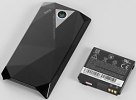
Now here's some news that can make the day for any Touch Diamond user. Soon the price tag of 50 euro (or 80 US dollars) can get you an original extended battery for your beloved devices - along with a spanking new replacement back cover tjavascript:void(0)o accommodate the added bulkiness.

The new HTC Diamond extended battery BP E270 is an original HTC product with a capacity of 1350 mAh. The new battery and back cover will surely add some thickness and weight to the device, but that would be reasonably compensated by the added uptime. Having in mind the usability issues that the good-looking diamond-shaped back panel brings along, we are a bit let down that HTC haven't made the new replacement cover flat. The extended battery pack BP E270 is a great new accessory but it sounds a bit overpriced at 50 euro (or 80 US dollars).

Before you shell out the cash on the original battery, you may also consider a third-party alternative that's not only already available, but also a bit more affordable.

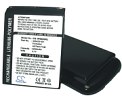
The second alternative pumped up battery is by the Chinese manufacturer Cameron Sino and it would only set you back 33 euro (or 51 US dollars). It's rated at a 1800 mAh and comes with a replacement back cover too. This one's flat however, and while we still don't know whether it looks as good as it's supposed to, we welcome the opportunity for making our Diamond-back totally flat-back (those two names actually sound like two different animal species - too much Discovery Channel, we know).

HTC Touch Diamond extended battery packHTC Touch Diamond extended battery pack

Back to cell phone batteries, we are also glad to share that you can find the official Touch Diamond battery available for pre-order here, while the third-party replacement pack can be found here - both from the online store of Clove Technology UK.

HTC Diamond Vs. Apple iPhone - the ultimate specs comparison


htc-apple-face-off.jpg


The Touch Diamond handset was announced on Tuesday by HTC, and as expected, every blog and newspaper is calling it the first real 'iPhone killer'. And here was me thinking we'd expired that term!

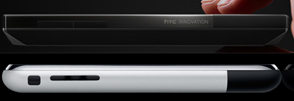
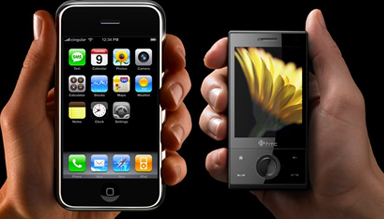
Obviously, the Diamond and iPhone have some similarities (even hired similar hand-models!), but the main difference which is dividing everyone's affections boils down to the original format wars - Mac vs. PC. Want a concise break-down of the pros and cons of each mobile? Whoomp, there it is - below the jump.htc-diamond-apple-iphone-2.jpg

Dimensions

The Diamond measures 102mm in height, is 51mm wide and 11.5mm thick, whereas the iPhone comes in at 115mm high, is 61mm wide and 11.6mm thick, weighing 135g. The Diamond is a shade lighter, at 110g.


Display

HTC has put a 480 x 640, 2.8" TFT LCD touch-sensitive screen on the Diamond, and as you probably know by now, the iPhone has an impressive 480 x 320 3.5" multi-touch display.
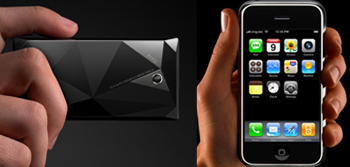
apple-iphone-htc-diamond.jpg

Operating System

The former runs on the new Windows Mobile 6.1 Professional, the first HTC phone to do so. However similar it may be to WM 6.0, HTC has actually layered their own software on over the phone, giving it a more user-friendly navigational system, and TouchFLO 3D technology, which we first saw in the Touch last year.

You can draw a huge comparison between the Diamond and iPhone due to the TouchFLO 3D, with users able to browse through photos and songs sliding their finger along the screen, much as you would on the iPhone.

The iPhone runs on OS X, which is Apple's very own operating system, and as we learned recently with Psystar, very much exclusive to them.


Memory


Buried within the Diamond, HTC has planted 4GB of internal flash storage, plus given the handset 192 MB DDR SDRAM, and a 256 MB ROM. A microSD card slot is supported, for additional storage.

Meanwhile, the iPhone comes in two options, an 8GB or 16GB flash drive, and has 128MB of RAM.

Camera

The camera on the Diamond is quite impressive, with a 3.2-megapixel sensor, and auto focus. The internal accelerometer means the Diamond acts like the iPhone, so photos can be viewed in landscape-stylee and be browsed through with a flick of the finger. The Diamond also has a second camera on the front, a VGA CMOS colour camera, for video-calling.

The camera on the iPhone isn't quite as impressive, with just a 2.0-megapixel sensor, and no auto focus, flash or any editing software.
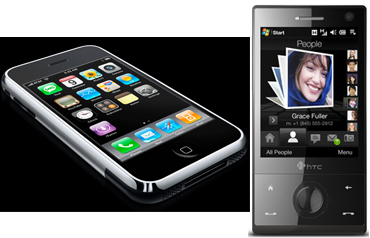
apple-htc.jpg

Media Player


An integrated speaker and FM radio feature in the Diamond, with the iPhone lacking both - well, you can play tunes through the tiny inbuilt one, but we wouldn't suggest it. However, the iPhone's main thrill is indeed the iPod functionality, and with 8GB or 16GB options, that's a lot of AAC, Protected AAC, MP3, MP3 VBR, Audible (formats 1, 2, and 3), Apple Lossless, AIFF, and WAV. Meanwhile, the Diamond supports MP3, AAC, AAC+, WMA, WAV and AMR-NB.

Connectivity

Rumours have abounded since the first generation of iPhones came out, that the next model would have 3G connectivity. We're now hoping for a June announcement and release date, but nothing has been confirmed as yet. The Diamond has managed to pip it to the post, with HSDPA connectivity, and 384 kbps up-link and 7.2 Mbps down-link speeds.

The iPhone, meanwhile, has, err, Wi-Fi, and, uh...Bluetooth...

GPS

The Diamond has GPS and A-GPS, however not much else is known about it than that. The iPhone, on the other hand, has Google Maps, which is a pleasure to use, particularly in conjunction with the multi-touchscreen.
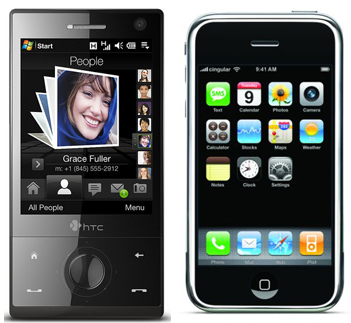
htc-diamond-apple-iphone.jpg

Battery Life

You'll get a fair bit out of the Diamond, with 270 minutes' talktime for WCDMA and up to 330 minutes on GSM networks, whereas standby is 396 hours and 285 hours respectively. When video-calling, users will get up to 145 minutes on WCDMA.

The iPhone is advertised as having up to eight hours of talk time, up to 250 hours of standby, 6 hours of internet use, 7 hours of video playback, and up to 24 hours of audio playback.

Availability and Pricing

The HTC Diamond will be out in June, with pricing not yet confirmed. The iPhone is already out, and available on 18 month contracts for either £35, £45 or £55 a month, plus of course the upfront fee. Apple's third party retailers (O2, Carphone Warehouse) recently cut the price of the 8GB model, to £169, however they appear to not be selling them anymore. The 16GB model is £329 upfront.

Wednesday, July 9, 2008

HTC Touch Diamond keyboard and texting demo


Since the video demo of the HTC Touch Diamond was posted on Phone Mag, there has been numerous requests for a demo of the keyboard and SMS messaging interface. Our own Vincent has taken it upon himself to get this video demo of those two aspects of this device up and ready for your viewing pleasure.


Here it is. As you can see, when a key is pressed, it gets larger. This is similar to the iPhone, but a good idea is a good idea, right? There is a symbol menu, and a number pad. The keyboard is large enough to get things done, but may be a little hard to type up documents and such. Then again, the Diamond is not nearly as targeted for suits as HTC’s other products.

No haptic feedback on the device, but to many that is not desirable anyways, unless it is localized. The messaging interface is threaded style. Threaded SMS is a huge improvement over traditional SMS, especially if you are forgetful like me.


HTC Touch Diamond soft reset


Possibly one of the most common questions that I have been asked this week by email and through comments posted on the site is how to soft reset the HTC Touch Diamond.

Seems that many think that the Diamond doesn't have a soft reset button and that the only way to reset a hung device is to pop the battery out and put it back in.

However, this isn't the case. The Diamond does indeed have a reset button that you can press with your stylus, it's just in a slightly unusual place. Don't go poking your stylus in the two holes on the bottom of the device, neither of these are the reset button. The square hole is where you attach a lanyard or phone charm and the round one next to the USB connector is the MIC. Don't go forcing your stylus in the MIC hole - we've heard that some people have already damaged their phones because of this.

In actual fact that reset button is located just under the bit where the stylus slides in. If you remove the stylus you'll see a little red button and the word reset. You can in fact press this button if you poke it with the stylus at an angle but it's a little easier to get to if you pop the back cover open a bit.

HTC Touch Diamond reset button

Tuesday, July 8, 2008

Winterface – Cool & Fresh Breeze in the World of Windows Mobile Interface


Highly customizable Shell to improve standard WM interface

July 7, 2008 - VITO Technology releases Winterface - a major breakthrough in the world of Windows Mobile interface. Winterface is the Next Generation Shell for Windows Mobile comprising the options of a launcher, a task manager, and a multitude of Today plug-ins. Winterface gives the user unprecedented freedom to easily lay out interface exactly the way they like it.


As a shell Winterface removes the necessity to turn to default Windows Mobile interface: Today screen and Start menu. Winterface opens instantly whenever users draw a simple gesture on the screen. It allows users to have as many screens as they need and put on them icons for applications, settings and contacts.


The screens are flipped through with sliding finger gestures. The icons for such applications as phone, sms, email, battery, clock, calendar, memory, etc. - all show relevant information and thus replace a number of Today plug-ins.


As a launcher Winterface features one tap launch of any installed applications and settings. A tap on a contact icon opens a menu with contact details from where you can call, send text message, email, browse URL, etc.


As a task manager Winterface lets you easily switch between running applications. A fixed icon on the first screen lets users see running programs, switch between them or close them.


It is very convenient to organize icons on screens by a certain topic. Users can set up a screen with favorite contacts, a screen with most used applications, a screen with icons-indicators (battery, memory, calendar, clock, etc.), and so on, as far as their fantasy goes! Icons are easily moved on the screen and between screens by drag’n’drop gestures.


Winterface is available for $19.95 at Winterface - Next Generation Shell for your Windows Mobile device. There is also a free 14-day fully functional trial available as a cab or exe installer.

VITO Technology Inc. is known for its innovative products in the field of Windows Mobile and Symbian software, GPS navigation and custom projects. Introduced in this press-release Winterface is a next generation mobile shell for Windows Mobile touch screen devices.
###


Useful links:
Download desktop installer: http://iwindowsmobile.com/files/Winterface.exe
Download mobile (on-device) installer: http://iwindowsmobile.com/files/Winterface.cab
Program page: Winterface - Next Generation Shell for your Windows Mobile device

PS: If you like this application, download it, try and post your comment and you will get a free copy of Winterface.